في المثال السابق ، تم استخدام جلسة HTTP (وملفات تعريف الارتباط) لتفويض الطلبات إلى الخادم. ومع ذلك ، لتنفيذ خدمة REST ، فإن طريقة الترخيص هذه ليست مناسبة ، حيث أن أحد متطلبات بنية REST هو عدم وجود الحالة. في هذه المقالة ، سنقوم بتنفيذ خدمة REST ، حيث سيتم تنفيذ تفويض الطلبات باستخدام رمز وصول.
قليلا من النظرية
المصادقة هي عملية التحقق من بيانات اعتماد المستخدم (تسجيل الدخول / كلمة المرور). تتم مصادقة المستخدم من خلال مقارنة تسجيل الدخول / كلمة المرور التي أدخلها مع البيانات المحفوظة.
التخويل هو التحقق من حقوق المستخدم للوصول إلى موارد معينة. يتم تنفيذ التفويض مباشرة عندما يصل المستخدم إلى المورد.
لنأخذ في الاعتبار ترتيب عمل الطريقتين المذكورتين أعلاه للمصادقة على الطلبات.
تفويض الطلبات باستخدام جلسة HTTP:
- يتم مصادقة المستخدم بأي طريقة من الطرق.
- يتم إنشاء جلسة HTTP على الخادم وملف تعريف ارتباط JSESSIONID يخزن معرف الجلسة.
- يتم نقل ملف تعريف الارتباط JSESSIONID إلى العميل وتخزينه في المتصفح.
- مع كل طلب لاحق ، يتم إرسال ملف تعريف ارتباط JSESSIONID إلى الخادم.
- يعثر الخادم على جلسة HTTP المقابلة مع معلومات حول المستخدم الحالي ويحدد ما إذا كان المستخدم لديه الإذن لإجراء هذه المكالمة.
- للخروج من التطبيق ، يجب حذف جلسة HTTP من الخادم.
تفويض الطلبات باستخدام رمز الوصول:
- يتم مصادقة المستخدم بأي طريقة من الطرق.
- ينشئ الخادم رمز وصول موقّعًا بمفتاح خاص ثم يرسله إلى العميل. يحتوي الرمز المميز على معرف المستخدم ودوره.
- يتم تخزين الرمز المميز على العميل وإرساله إلى الخادم مع كل طلب لاحق. عادةً ما يتم استخدام رأس HTTP Authorization لنقل الرمز المميز.
- يتحقق الخادم من توقيع الرمز ، ويستخرج منه معرف المستخدم ، ودوره ، ويحدد ما إذا كان للمستخدم الحق في إجراء هذه المكالمة.
- للخروج من التطبيق ، ما عليك سوى إزالة الرمز المميز على العميل دون الحاجة إلى التفاعل مع الخادم.
JSON Web Token (JWT) هو حاليًا تنسيق رمز وصول شائع. يحتوي رمز JWT المميز على ثلاث مجموعات ، مفصولة بنقاط: الرأس ، الحمولة ، والتوقيع. أول كتلتين بتنسيق JSON وتم ترميزهما بتنسيق base64. يمكن أن تتكون مجموعة الحقول من أسماء محجوزة (إصدار ، iat ، exp) أو أزواج اسم / قيمة عشوائية. يمكن إنشاء التوقيع باستخدام كل من خوارزميات التشفير المتماثل وغير المتماثل.
التنفيذ
سنقوم بتنفيذ خدمة REST التي توفر واجهة برمجة التطبيقات التالية:
- الحصول / المصادقة / تسجيل الدخول - ابدأ عملية مصادقة المستخدم.
- POST / auth / token - اطلب زوجًا جديدًا من رموز الوصول / التحديث.
- GET / api / repositories - احصل على قائمة مستودعات Bitbucket للمستخدم الحالي.
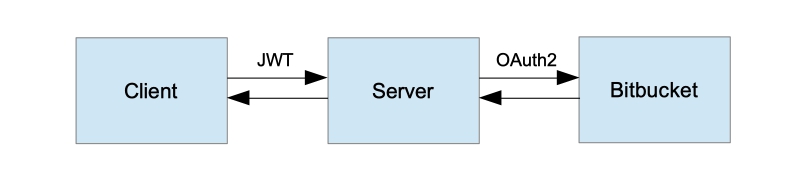
رفيع المستوى طلب العمارة
ملاحظة أنه منذ تطبيق يتكون من ثلاثة مكونات التفاعل، بالإضافة إلى تفويض طلبات العميل إلى الملقم، Bitbucket يخول طلبات الخادم إليها. لن نقوم بتكوين تفويض الطريقة حسب الدور ، حتى لا نجعل المثال أكثر تعقيدًا. لدينا طريقة API واحدة فقط GET / api / repositories لا يمكن استدعاؤها إلا من قبل المستخدمين المصادق عليهم. يمكن للخادم إجراء أي عمليات على Bitbucket يسمح بها تسجيل OAuth للعميل.
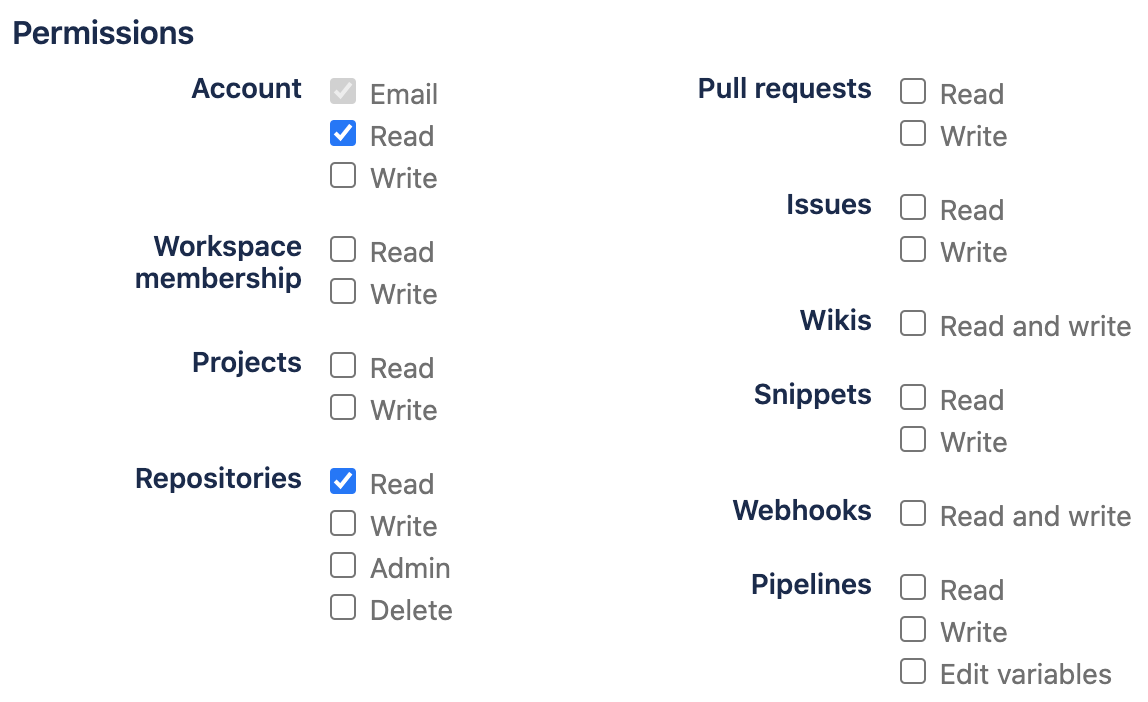
تم وصف عملية تسجيل عميل OAuth في المقالة السابقة .
وللتنفيذ ، سوف نستخدم Spring Boot الإصدار 2.2.2.RELEASE و Spring Security الإصدار 5.2.1.RELEASE.
تجاوز المصادقة EntryPoint
في تطبيق الويب القياسي ، عند الوصول إلى مورد آمن ولا يوجد كائن مصادقة في سياق الأمان ، سيعيد Spring Security توجيه المستخدم إلى صفحة المصادقة. ومع ذلك ، بالنسبة لخدمة REST ، سيكون السلوك الأكثر ملاءمة في هذه الحالة هو إرجاع حالة HTTP 401 (غير مصرح به).
RestAuthenticationEntryPoint
public class RestAuthenticationEntryPoint implements AuthenticationEntryPoint {

    @Override
    public void commence(
            HttpServletRequest request,
            HttpServletResponse response,
            AuthenticationException authException) throws IOException {
        response.sendError(HttpServletResponse.SC_UNAUTHORIZED, authException.getMessage());
    }
}
أنشئ نقطة نهاية لتسجيل الدخول
ما زلنا نستخدم OAuth2 مع نوع تفويض رمز التفويض لمصادقة المستخدم. ومع ذلك ، في الخطوة السابقة ، استبدلنا AuthenticationEntryPoint القياسي بتطبيقنا الخاص ، لذلك نحن بحاجة إلى طريقة واضحة لبدء عملية المصادقة. عندما نرسل طلب GET إلى / auth / login ، سنعيد توجيه المستخدم إلى صفحة مصادقة Bitbucket. ستكون معلمة هذه الطريقة هي عنوان URL لمعاودة الاتصال ، حيث سنعيد رمز الوصول بعد المصادقة الناجحة.
نقطة نهاية تسجيل الدخول
@Path("/auth")
public class AuthEndpoint extends EndpointBase {

...

    @GET
    @Path("/login")
    public Response authorize(@QueryParam(REDIRECT_URI) String redirectUri) {
        String authUri = "/oauth2/authorization/bitbucket";
        UriComponentsBuilder builder = fromPath(authUri).queryParam(REDIRECT_URI, redirectUri);
        return handle(() -> temporaryRedirect(builder.build().toUri()).build());
    }
}
تجاوز المصادقة على المصادقة
يتم استدعاء AuthenticationSuccessHandler بعد المصادقة الناجحة. لنقم بإنشاء رمز وصول هنا ، رمز تحديث مميز وإعادة التوجيه إلى عنوان رد الاتصال الذي تم إرساله في بداية عملية المصادقة. نعيد رمز الوصول مع معلمة طلب GET ، ورمز التحديث في ملف تعريف الارتباط httpOnly. سنقوم بتحليل رمز التحديث لاحقًا.
exampleAuthenticationSuccessHandler
public class ExampleAuthenticationSuccessHandler extends SimpleUrlAuthenticationSuccessHandler {

    private final TokenService tokenService;

    private final AuthProperties authProperties;

    private final HttpCookieOAuth2AuthorizationRequestRepository authorizationRequestRepository;

    public ExampleAuthenticationSuccessHandler(
            TokenService tokenService,
            AuthProperties authProperties,
            HttpCookieOAuth2AuthorizationRequestRepository authorizationRequestRepository) {
        this.tokenService = requireNonNull(tokenService);
        this.authProperties = requireNonNull(authProperties);
        this.authorizationRequestRepository = requireNonNull(authorizationRequestRepository);
    }

    @Override
    public void onAuthenticationSuccess(HttpServletRequest request, HttpServletResponse response, Authentication authentication) throws IOException, ServletException {
        log.info("Logged in user {}", authentication.getPrincipal());
        super.onAuthenticationSuccess(request, response, authentication);
    }

    @Override
    protected String determineTargetUrl(HttpServletRequest request, HttpServletResponse response, Authentication authentication) {
        Optional<String> redirectUri = getCookie(request, REDIRECT_URI).map(Cookie::getValue);

        if (redirectUri.isPresent() && !isAuthorizedRedirectUri(redirectUri.get())) {
            throw new BadRequestException("Received unauthorized redirect URI.");
        }

        return UriComponentsBuilder.fromUriString(redirectUri.orElse(getDefaultTargetUrl()))
                .queryParam("token", tokenService.newAccessToken(toUserContext(authentication)))
                .build().toUriString();
    }

    @Override
    protected void handle(HttpServletRequest request, HttpServletResponse response, Authentication authentication) throws IOException {
        redirectToTargetUrl(request, response, authentication);
    }

    private boolean isAuthorizedRedirectUri(String uri) {
        URI clientRedirectUri = URI.create(uri);
        return authProperties.getAuthorizedRedirectUris()
                .stream()
                .anyMatch(authorizedRedirectUri -> {
                    // Only validate host and port. Let the clients use different paths if they want to.
                    URI authorizedURI = URI.create(authorizedRedirectUri);
                    return authorizedURI.getHost().equalsIgnoreCase(clientRedirectUri.getHost())
                            && authorizedURI.getPort() == clientRedirectUri.getPort();
                });
    }

    private TokenService.UserContext toUserContext(Authentication authentication) {
        ExampleOAuth2User principal = (ExampleOAuth2User) authentication.getPrincipal();
        return TokenService.UserContext.builder()
                .login(principal.getName())
                .name(principal.getFullName())
                .build();
    }

    private void addRefreshTokenCookie(HttpServletResponse response, Authentication authentication) {
        RefreshToken token = tokenService.newRefreshToken(toUserContext(authentication));
        addCookie(response, REFRESH_TOKEN, token.getId(), (int) token.getValiditySeconds());
    }

    private void redirectToTargetUrl(HttpServletRequest request, HttpServletResponse response, Authentication authentication) throws IOException {
        String targetUrl = determineTargetUrl(request, response, authentication);

        if (response.isCommitted()) {
            logger.debug("Response has already been committed. Unable to redirect to " + targetUrl);
            return;
        }

        addRefreshTokenCookie(response, authentication);
        authorizationRequestRepository.removeAuthorizationRequestCookies(request, response);
        getRedirectStrategy().sendRedirect(request, response, targetUrl);
    }
}
تجاوز المصادقةFailureHandler
في حالة عدم مصادقة المستخدم ، سنقوم بإعادة توجيهه إلى عنوان رد الاتصال الذي تم تمريره في بداية عملية المصادقة مع معلمة الخطأ التي تحتوي على نص الخطأ.
exampleAuthenticationFailureHandler
public class ExampleAuthenticationFailureHandler implements AuthenticationFailureHandler {

    private final RedirectStrategy redirectStrategy = new DefaultRedirectStrategy();

    private final HttpCookieOAuth2AuthorizationRequestRepository authorizationRequestRepository;

    public ExampleAuthenticationFailureHandler(
            HttpCookieOAuth2AuthorizationRequestRepository authorizationRequestRepository) {
        this.authorizationRequestRepository = requireNonNull(authorizationRequestRepository);
    }

    @Override
    public void onAuthenticationFailure(HttpServletRequest request, HttpServletResponse response, AuthenticationException exception) throws IOException {
        String targetUrl = getFailureUrl(request, exception);
        authorizationRequestRepository.removeAuthorizationRequestCookies(request, response);
        redirectStrategy.sendRedirect(request, response, targetUrl);
    }

    private String getFailureUrl(HttpServletRequest request, AuthenticationException exception) {
        String targetUrl = getCookie(request, Cookies.REDIRECT_URI)
                .map(Cookie::getValue)
                .orElse(("/"));

        return UriComponentsBuilder.fromUriString(targetUrl)
                .queryParam("error", exception.getLocalizedMessage())
                .build().toUriString();
    }
}
إنشاء TokenAuthenticationFilter
تتمثل مهمة عامل التصفية هذا في استخراج رمز الوصول من رأس التخويل ، إن وجد ، للتحقق من صحته وتهيئة سياق الأمان.
التصفية الرمزية
public class TokenAuthenticationFilter extends OncePerRequestFilter {

    private final UserService userService;

    private final TokenService tokenService;

    public TokenAuthenticationFilter(
            UserService userService, TokenService tokenService) {
        this.userService = requireNonNull(userService);
        this.tokenService = requireNonNull(tokenService);
    }

    @Override
    protected void doFilterInternal(@NotNull HttpServletRequest request, @NotNull HttpServletResponse response, @NotNull FilterChain chain) throws ServletException, IOException {
        try {
            Optional<String> jwtOpt = getJwtFromRequest(request);
            if (jwtOpt.isPresent()) {
                String jwt = jwtOpt.get();
                if (isNotEmpty(jwt) && tokenService.isValidAccessToken(jwt)) {
                    String login = tokenService.getUsername(jwt);
                    Optional<User> userOpt = userService.findByLogin(login);
                    if (userOpt.isPresent()) {
                        User user = userOpt.get();
                        ExampleOAuth2User oAuth2User = new ExampleOAuth2User(user);
                        OAuth2AuthenticationToken authentication = new OAuth2AuthenticationToken(oAuth2User, oAuth2User.getAuthorities(), oAuth2User.getProvider());
                        authentication.setDetails(new WebAuthenticationDetailsSource().buildDetails(request));

                        SecurityContextHolder.getContext().setAuthentication(authentication);
                    }
                }
            }
        } catch (Exception e) {
            logger.error("Could not set user authentication in security context", e);
        }

        chain.doFilter(request, response);
    }

    private Optional<String> getJwtFromRequest(HttpServletRequest request) {
        String token = request.getHeader(AUTHORIZATION);
        if (isNotEmpty(token) && token.startsWith("Bearer ")) {
            token = token.substring(7);
        }
        return Optional.ofNullable(token);
    }
}
إنشاء نقطة نهاية رمز التحديث
لأسباب أمنية ، عادةً ما يظل عمر رمز الوصول صغيرًا. بعد ذلك ، إذا تمت سرقته ، فلن يتمكن المهاجم من استخدامه إلى أجل غير مسمى. من أجل عدم إجبار المستخدم على تسجيل الدخول إلى التطبيق مرارًا وتكرارًا ، يتم استخدام رمز التحديث. يتم إصداره من قبل الخادم بعد مصادقة ناجحة جنبًا إلى جنب مع رمز الوصول وله عمر أطول. باستخدامه ، يمكنك طلب زوج جديد من الرموز المميزة. يوصى بتخزين رمز التحديث في ملف تعريف الارتباط httpOnly.
تحديث نقطة نهاية الرمز المميز
@Path("/auth")
public class AuthEndpoint extends EndpointBase {

...

    @POST
    @Path("/token")
    @Produces(APPLICATION_JSON)
    public Response refreshToken(@CookieParam(REFRESH_TOKEN) String refreshToken) {
        return handle(() -> {
            if (refreshToken == null) {
                throw new InvalidTokenException("Refresh token was not provided.");
            }
            RefreshToken oldRefreshToken = tokenService.findRefreshToken(refreshToken);
            if (oldRefreshToken == null || !tokenService.isValidRefreshToken(oldRefreshToken)) {
                throw new InvalidTokenException("Refresh token is not valid or expired.");
            }

            Map<String, String> result = new HashMap<>();
            result.put("token", tokenService.newAccessToken(of(oldRefreshToken.getUser())));

            RefreshToken newRefreshToken = newRefreshTokenFor(oldRefreshToken.getUser());
            return Response.ok(result).cookie(createRefreshTokenCookie(newRefreshToken)).build();
        });
    }
}
تجاوز AuthorizationRequestRepository
يستخدم Spring Security كائن AuthorizationRequestRepository لتخزين كائنات OAuth2AuthorizationRequest طوال مدة عملية المصادقة. التنفيذ الافتراضي هو فئة HttpSessionOAuth2AuthorizationRequestRepository ، والتي تستخدم جلسة HTTP كمستودع. لان يجب ألا تخزن خدمتنا الدولة ، فهذا التنفيذ لا يناسبنا. دعونا ننفذ صنفنا الخاص الذي سيستخدم ملفات تعريف الارتباط HTTP.
HttpCookieOAuth2AuthorizationRequestRepository
public class HttpCookieOAuth2AuthorizationRequestRepository implements AuthorizationRequestRepository<OAuth2AuthorizationRequest> {

    private static final int COOKIE_EXPIRE_SECONDS = 180;

    private static final String OAUTH2_AUTHORIZATION_REQUEST_COOKIE_NAME = "OAUTH2-AUTH-REQUEST";

    @Override
    public OAuth2AuthorizationRequest loadAuthorizationRequest(HttpServletRequest request) {
        return getCookie(request, OAUTH2_AUTHORIZATION_REQUEST_COOKIE_NAME)
                .map(cookie -> deserialize(cookie, OAuth2AuthorizationRequest.class))
                .orElse(null);
    }

    @Override
    public void saveAuthorizationRequest(OAuth2AuthorizationRequest authorizationRequest, HttpServletRequest request, HttpServletResponse response) {
        if (authorizationRequest == null) {
            removeAuthorizationRequestCookies(request, response);
            return;
        }

        addCookie(response, OAUTH2_AUTHORIZATION_REQUEST_COOKIE_NAME, serialize(authorizationRequest), COOKIE_EXPIRE_SECONDS);
        String redirectUriAfterLogin = request.getParameter(QueryParams.REDIRECT_URI);
        if (isNotBlank(redirectUriAfterLogin)) {
            addCookie(response, REDIRECT_URI, redirectUriAfterLogin, COOKIE_EXPIRE_SECONDS);
        }
    }

    @Override
    public OAuth2AuthorizationRequest removeAuthorizationRequest(HttpServletRequest request) {
        return loadAuthorizationRequest(request);
    }

    public void removeAuthorizationRequestCookies(HttpServletRequest request, HttpServletResponse response) {
        deleteCookie(request, response, OAUTH2_AUTHORIZATION_REQUEST_COOKIE_NAME);
        deleteCookie(request, response, REDIRECT_URI);
    }

    private static String serialize(Object object) {
        return Base64.getUrlEncoder().encodeToString(SerializationUtils.serialize(object));
    }

    @SuppressWarnings("SameParameterValue")
    private static <T> T deserialize(Cookie cookie, Class<T> clazz) {
        return clazz.cast(SerializationUtils.deserialize(Base64.getUrlDecoder().decode(cookie.getValue())));
    }
}
تكوين أمان الربيع
دعونا نجمع كل ما سبق معًا ونقوم بتهيئة Spring Security.
WebSecurityConfig
@Configuration
@EnableWebSecurity
public static class WebSecurityConfig extends WebSecurityConfigurerAdapter {

    private final ExampleOAuth2UserService userService;

    private final TokenAuthenticationFilter tokenAuthenticationFilter;

    private final AuthenticationFailureHandler authenticationFailureHandler;

    private final AuthenticationSuccessHandler authenticationSuccessHandler;

    private final HttpCookieOAuth2AuthorizationRequestRepository authorizationRequestRepository;

    @Autowired
    public WebSecurityConfig(
            ExampleOAuth2UserService userService,
            TokenAuthenticationFilter tokenAuthenticationFilter,
            AuthenticationFailureHandler authenticationFailureHandler,
            AuthenticationSuccessHandler authenticationSuccessHandler,
            HttpCookieOAuth2AuthorizationRequestRepository authorizationRequestRepository) {
        this.userService = userService;
        this.tokenAuthenticationFilter = tokenAuthenticationFilter;
        this.authenticationFailureHandler = authenticationFailureHandler;
        this.authenticationSuccessHandler = authenticationSuccessHandler;
        this.authorizationRequestRepository = authorizationRequestRepository;
    }

    @Override
    protected void configure(HttpSecurity http) throws Exception {
        http
                .cors().and()
                .csrf().disable()
                .formLogin().disable()
                .httpBasic().disable()
                .sessionManagement(sm -> sm.sessionCreationPolicy(STATELESS))
                .exceptionHandling(eh -> eh
                        .authenticationEntryPoint(new RestAuthenticationEntryPoint())
                )
                .authorizeRequests(authorizeRequests -> authorizeRequests
                        .antMatchers("/auth/**").permitAll()
                        .anyRequest().authenticated()
                )
                .oauth2Login(oauth2Login -> oauth2Login
                        .failureHandler(authenticationFailureHandler)
                        .successHandler(authenticationSuccessHandler)
                        .userInfoEndpoint(userInfoEndpoint -> userInfoEndpoint.userService(userService))
                        .authorizationEndpoint(authEndpoint -> authEndpoint.authorizationRequestRepository(authorizationRequestRepository))
                );

        http.addFilterBefore(tokenAuthenticationFilter, UsernamePasswordAuthenticationFilter.class);
    }
}
إنشاء نقطة نهاية المستودعات
لهذا السبب كانت هناك حاجة للمصادقة من خلال OAuth2 و Bitbucket - القدرة على استخدام Bitbucket API للوصول إلى مواردك. نستخدم مستودعات Bitbucket API للحصول على قائمة بمستودعات المستخدم الحالي.
نقطة نهاية المستودعات
@Path("/api")
public class ApiEndpoint extends EndpointBase {

    @Autowired
    private BitbucketService bitbucketService;

    @GET
    @Path("/repositories")
    @Produces(APPLICATION_JSON)
    public List<Repository> getRepositories() {
        return handle(bitbucketService::getRepositories);
    }
}

public class BitbucketServiceImpl implements BitbucketService {

    private static final String BASE_URL = "https://api.bitbucket.org";

    private final Supplier<RestTemplate> restTemplate;

    public BitbucketServiceImpl(Supplier<RestTemplate> restTemplate) {
        this.restTemplate = restTemplate;
    }

    @Override
    public List<Repository> getRepositories() {
        UriComponentsBuilder uriBuilder = fromHttpUrl(format("%s/2.0/repositories", BASE_URL));
        uriBuilder.queryParam("role", "member");

        ResponseEntity<BitbucketRepositoriesResponse> response = restTemplate.get().exchange(
                uriBuilder.toUriString(),
                HttpMethod.GET,
                new HttpEntity<>(new HttpHeadersBuilder()
                        .acceptJson()
                        .build()),
                BitbucketRepositoriesResponse.class);

        BitbucketRepositoriesResponse body = response.getBody();
        return body == null ? emptyList() : extractRepositories(body);
    }

    private List<Repository> extractRepositories(BitbucketRepositoriesResponse response) {
        return response.getValues() == null
                ? emptyList()
                : response.getValues().stream().map(BitbucketServiceImpl.this::convertRepository).collect(toList());
    }

    private Repository convertRepository(BitbucketRepository bbRepo) {
        Repository repo = new Repository();
        repo.setId(bbRepo.getUuid());
        repo.setFullName(bbRepo.getFullName());
        return repo;
    }
}
اختبارات
للاختبار ، نحتاج إلى خادم HTTP صغير لإرسال رمز وصول إليه. أولاً ، دعنا نحاول الاتصال بنقطة نهاية المستودعات بدون رمز وصول ونتأكد من حصولنا على خطأ 401 في هذه الحالة ، ثم سنقوم بالمصادقة. للقيام بذلك ، ابدأ الخادم وانتقل إلى المتصفح على http: // localhost: 8080 / auth / login . بعد إدخال اسم المستخدم / كلمة المرور ، سيتلقى العميل رمزًا مميزًا ويتصل بنقطة نهاية المستودعات مرة أخرى. ثم سيتم طلب رمز جديد وسيتم استدعاء نقطة نهاية المستودعات مرة أخرى بالرمز المميز الجديد.
OAuth2JwtExampleClient
public class OAuth2JwtExampleClient {

    /**
     * Start client, then navigate to http://localhost:8080/auth/login.
     */
    public static void main(String[] args) throws Exception {
        AuthCallbackHandler authEndpoint = new AuthCallbackHandler(8081);
        authEndpoint.start(SOCKET_READ_TIMEOUT, true);

        HttpResponse response = getRepositories(null);
        assert (response.getStatusLine().getStatusCode() == SC_UNAUTHORIZED);

        Tokens tokens = authEndpoint.getTokens();
        System.out.println("Received tokens: " + tokens);
        response = getRepositories(tokens.getAccessToken());
        assert (response.getStatusLine().getStatusCode() == SC_OK);
        System.out.println("Repositories: " + IOUtils.toString(response.getEntity().getContent(), UTF_8));

        // emulate token usage - wait for some time until iat and exp attributes get updated
        // otherwise we will receive the same token
        Thread.sleep(5000);

        tokens = refreshToken(tokens.getRefreshToken());
        System.out.println("Refreshed tokens: " + tokens);

        // use refreshed token
        response = getRepositories(tokens.getAccessToken());
        assert (response.getStatusLine().getStatusCode() == SC_OK);
    }

    private static Tokens refreshToken(String refreshToken) throws IOException {
        BasicClientCookie cookie = new BasicClientCookie(REFRESH_TOKEN, refreshToken);
        cookie.setPath("/");
        cookie.setDomain("localhost");
        BasicCookieStore cookieStore = new BasicCookieStore();
        cookieStore.addCookie(cookie);

        HttpPost request = new HttpPost("http://localhost:8080/auth/token");
        request.setHeader(ACCEPT, APPLICATION_JSON.getMimeType());

        HttpClient httpClient = HttpClientBuilder.create().setDefaultCookieStore(cookieStore).build();
        HttpResponse execute = httpClient.execute(request);

        Gson gson = new Gson();
        Type type = new TypeToken<Map<String, String>>() {
        }.getType();
        Map<String, String> response = gson.fromJson(IOUtils.toString(execute.getEntity().getContent(), UTF_8), type);

        Cookie refreshTokenCookie = cookieStore.getCookies().stream()
                .filter(c -> REFRESH_TOKEN.equals(c.getName()))
                .findAny()
                .orElseThrow(() -> new IOException("Refresh token cookie not found."));
        return Tokens.of(response.get("token"), refreshTokenCookie.getValue());
    }

    private static HttpResponse getRepositories(String accessToken) throws IOException {
        HttpClient httpClient = HttpClientBuilder.create().build();
        HttpGet request = new HttpGet("http://localhost:8080/api/repositories");
        request.setHeader(ACCEPT, APPLICATION_JSON.getMimeType());
        if (accessToken != null) {
            request.setHeader(AUTHORIZATION, "Bearer " + accessToken);
        }
        return httpClient.execute(request);
    }
}
إخراج وحدة تحكم العميل.
Received tokens: Tokens(accessToken=eyJhbGciOiJIUzUxMiJ9.eyJzdWIiOiJldm9sdmVjaS10ZXN0a2l0IiwidXNlcm5hbWUiOiJFdm9sdmVDSSBUZXN0a2l0IiwiaWF0IjoxNjA1NDY2MDMxLCJleHAiOjE2MDU0NjY2MzF9.UuRYMdIxzc8ZFEI2z8fAgLz-LG_gDxaim25pMh9jNrDFK6YkEaDqDO8Huoav5JUB0bJyf1lTB0nNPaLLpOj4hw, refreshToken=BBF6dboG8tB4XozHqmZE5anXMHeNUncTVD8CLv2hkaU2KsfyqitlJpgkV4HrQqPk)

Repositories: [{"id":"{c7bb4165-92f1-4621-9039-bb1b6a74488e}","fullName":"test-namespace/test-repository1"},{"id":"{aa149604-c136-41e1-b7bd-3088fb73f1b2}","fullName":"test-namespace/test-repository2"}]

Refreshed tokens: Tokens(accessToken=eyJhbGciOiJIUzUxMiJ9.eyJzdWIiOiJldm9sdmVjaS10ZXN0a2l0IiwidXNlcm5hbWUiOiJFdm9sdmVDSSBUZXN0a2l0IiwiaWF0IjoxNjA1NDY2MDM2LCJleHAiOjE2MDU0NjY2MzZ9.oR2A_9k4fB7qpzxvV5QKY1eU_8aZMYEom-ngc4Kuc5omeGPWyclfqmiyQTpJW_cHOcXbY9S065AE_GKXFMbh_Q, refreshToken=mdc5sgmtiwLD1uryubd2WZNjNzSmc5UGo6JyyzsiYsBgOpeaY3yw3T3l8IKauKYQ)
مصدر
كود المصدر الكامل للتطبيق الذي تمت مراجعته موجود على Github .
الروابط
ملاحظة:
تعمل خدمة REST التي أنشأناها عبر بروتوكول HTTP حتى لا تعقد المثال. ولكن نظرًا لأن الرموز المميزة الخاصة بنا غير مشفرة بأي شكل من الأشكال ، فمن المستحسن التبديل إلى قناة آمنة (HTTPS).