معلومات عامة
في المقالة السابقة ، تحدثنا عن كيفية إنشاء وظيفة ربط البطاقات المصرفية باستخدام قدرات التعرف على النص في HUAWEI ML Kit. يحتاج المستخدمون فقط إلى تحميل صورة لبطاقتهم ، وسيقوم التطبيق تلقائيًا بالتعرف على جميع المعلومات المهمة. هذا يجعل من السهل إدخال تفاصيل البطاقة المصرفية. ولكن هل يمكنك فعل الشيء نفسه مع الفواتير والقسائم؟ بالتأكيد تستطيع! في هذه المقالة ، سنوضح لك كيفية استخدام إمكانيات التعرف الضوئي على الحروف في HUAWEI ML Kit لإدخال أرقام الحسابات ورموز الخصم تلقائيًا.
موعد
يمكن استخدام وظيفة OCR في مجموعة متنوعة من المواقف. على سبيل المثال ، إذا قمت بمسح الفاتورة أدناه ضوئيًا ، فأشر إلى أن رقم الخدمة يبدأ بـ "NO.DE SERVICIO" وأدخل أيضًا حدًا للطول يصل إلى 12 حرفًا. ثم ستصلك بسرعة رقم الحساب "123456789123" باستخدام وظيفة التعرف على النص.

وبالمثل ، إذا قمت بمسح الكوبون أدناه ، قم بتخصيص بداية رمز "FAVE-" ، وحدد الطول بـ 4 أحرف لتلقي رمز الخصم "8329" ثم أكمل الدفع.

مفيد أليس كذلك؟ يمكنك أيضًا تخصيص البيانات التي يمكن لتطبيقك التعرف عليها.
تكامل وظيفة التعرف على النص
لذلك دعونا نتعرف على كيفية التعامل مع أرقام الحسابات وأكواد الخصم.
1. التحضير
1.1 Maven build.gradle
buildscript {
    repositories {
     ...
        maven {url 'https://developer.huawei.com/repo/'}
    }
}
 dependencies {
   ...
        classpath 'com.huawei.agconnect:agcp:1.3.1.300'
    }
allprojects {
    repositories {
     ...
        maven {url 'https://developer.huawei.com/repo/'}
    }
}
1.2
SDK :
apply plugin: 'com.android.application'
apply plugin: 'com.huawei.agconnect'
1.3 SDK build.gradle
dependencies {
    // Import the base SDK.
    implementation 'com.huawei.hms:ml-computer-vision-ocr:2.0.1.300'
    // Import the Latin character recognition model package.
    implementation 'com.huawei.hms:ml-computer-vision-ocr-latin-model:2.0.1.300'
    // Import the Japanese and Korean character recognition model package.
    implementation 'com.huawei.hms:ml-computer-vision-ocr-jk-model:2.0.1.300'
    // Import the Chinese and English character recognition model package.
    implementation 'com.huawei.hms:ml-computer-vision-ocr-cn-model:2.0.1.300'
}
1.4 AndroidManifest.xml
<manifest>
    ...
    <meta-data
        android:name="com.huawei.hms.ml.DEPENDENCY"
        android:value="ocr" />
     ...
</manifest>
1.5
<uses-permission android:name="android.permission.CAMERA" />
<uses-permission android:name="android.permission.INTERNET" />

<uses-feature android:name="android.hardware.camera" />
<uses-feature android:name="android.hardware.camera.autofocus" />
2.
2.1
MLTextAnalyzer analyzer = new MLTextAnalyzer.Factory(context).setLanguage(type).create();2.2
analyzer.setTransactor(new OcrDetectorProcessor());2.3 API
LensEngine SDK , .
lensEngine = new LensEngine.Creator(context, analyzer)
  .setLensType(LensEngine.BACK_LENS)
  .applyDisplayDimension(width, height)
  .applyFps(30.0f)
  .enableAutomaticFocus(true)
  .create();
2.4 run
try {
    lensEngine.run(holder);
} catch (IOException e) {
    // Exception handling logic.
    Log.e("TAG", "e=" + e.getMessage());
}
2.5 ,
public class OcrDetectorProcessor implements MLAnalyzer.MLTransactor<MLText.Block> {
    @Override
    public void transactResult(MLAnalyzer.Result<MLText.Block> results) {
         SparseArray<MLText.Block> items = results.getAnalyseList();
         // Process the recognition result as required. Only the detection results are processed.
        // Other detection-related APIs provided by ML Kit cannot be called.
        …
    }
    @Override
    public void destroy() {
        // Callback method used to release resources when the detection ends.
    }
}
2.6
if (analyzer != null) {
    try {
        analyzer.stop();
    } catch (IOException e) {
        // Exception handling.
    }
}
if (lensEngine != null) {
    lensEngine.release();
}
! , . , .
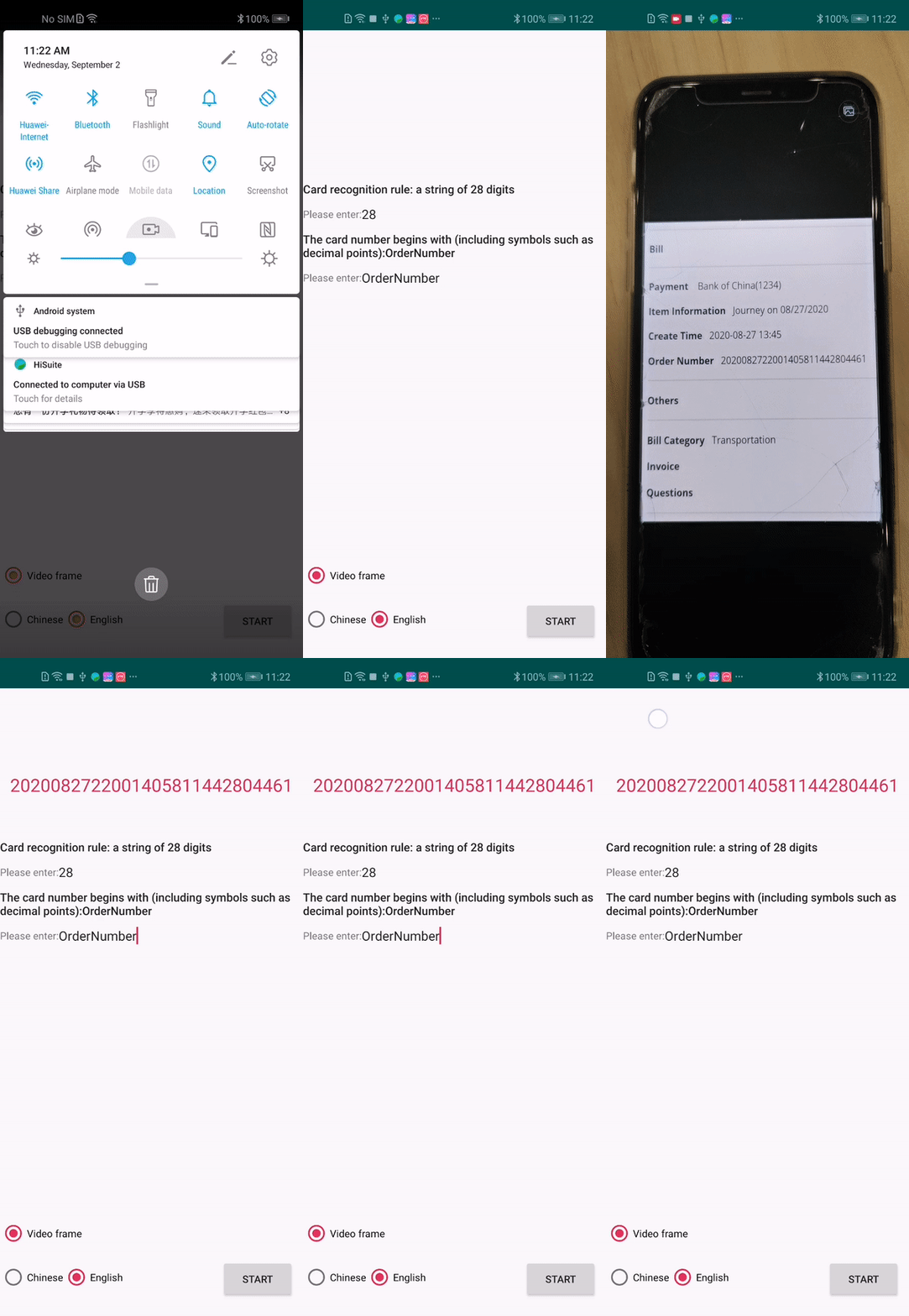
, .
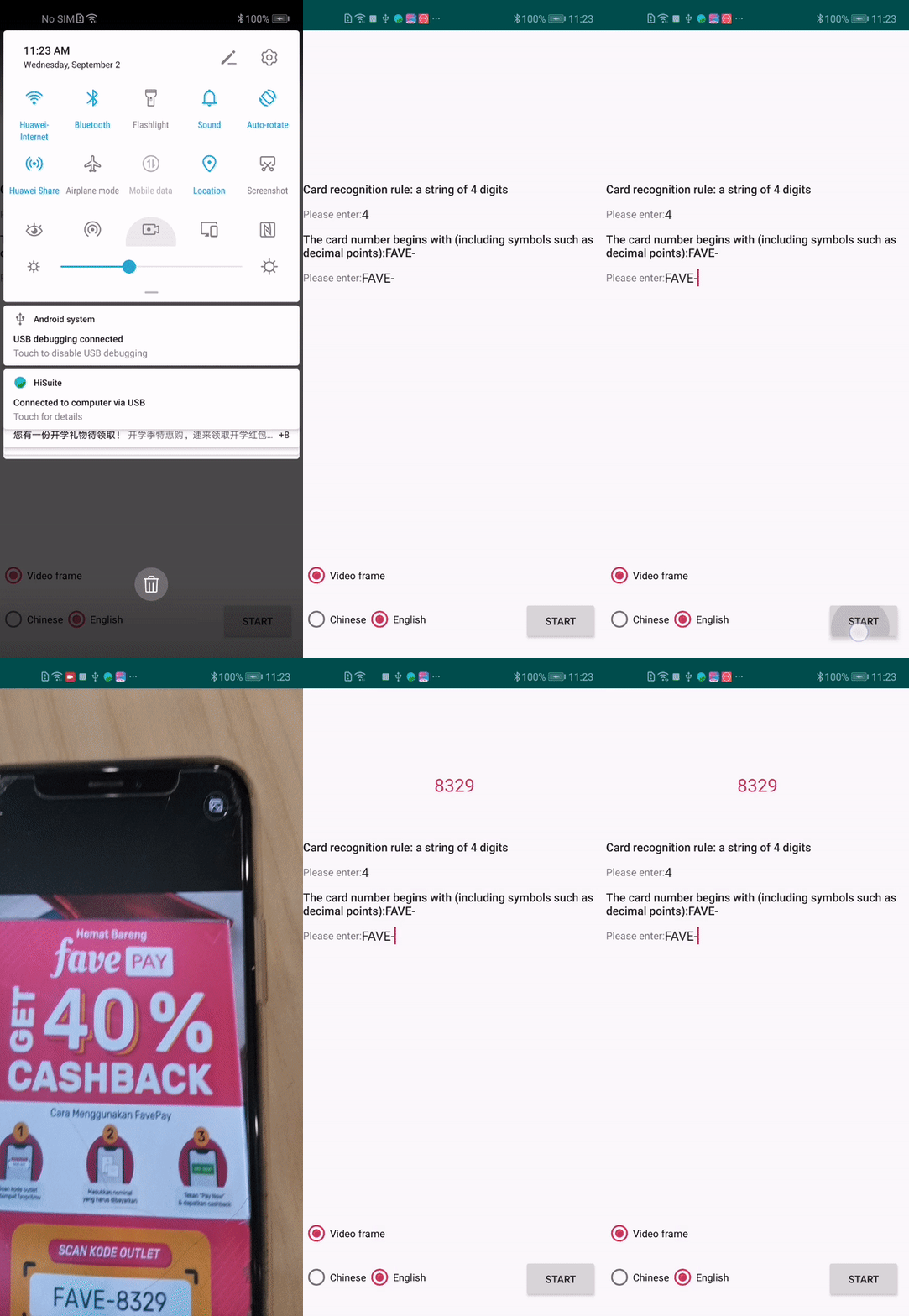
Github
→ Github
→ -: HUAWEI ML Kit — .