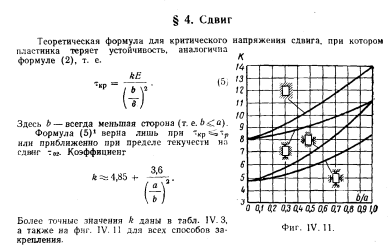
من الضروري تحديد ضغوط القص الحرجة بناءً على نوع المرفق ونسبة العرض إلى الارتفاع للوحة المستطيلة.
لنبدأ بإعداد الواجهة ، وسنتخذ Scene Builder للمساعدة.
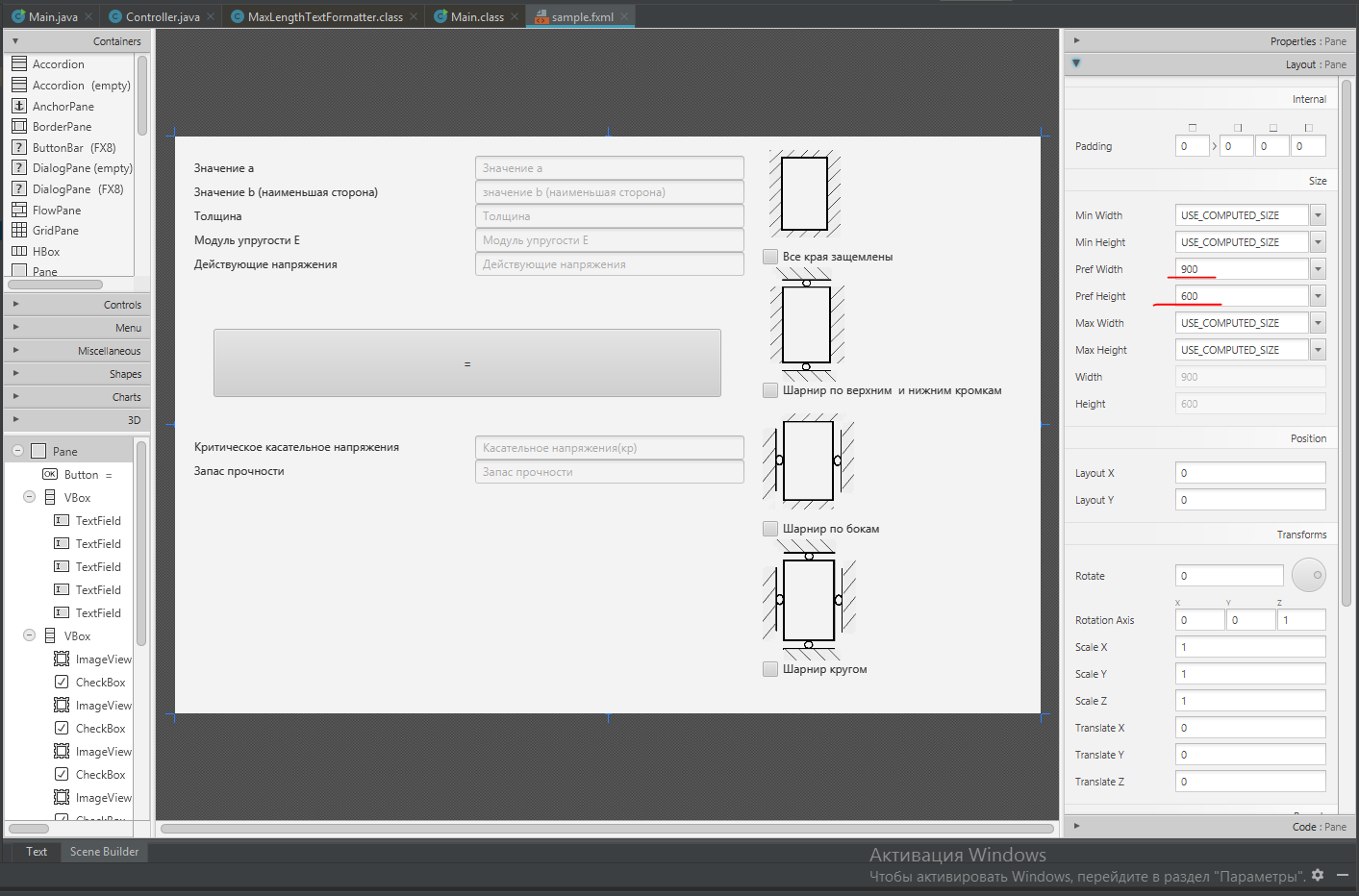
لنقم بإنشاء مساحة عمل بحجم 900 × 600.
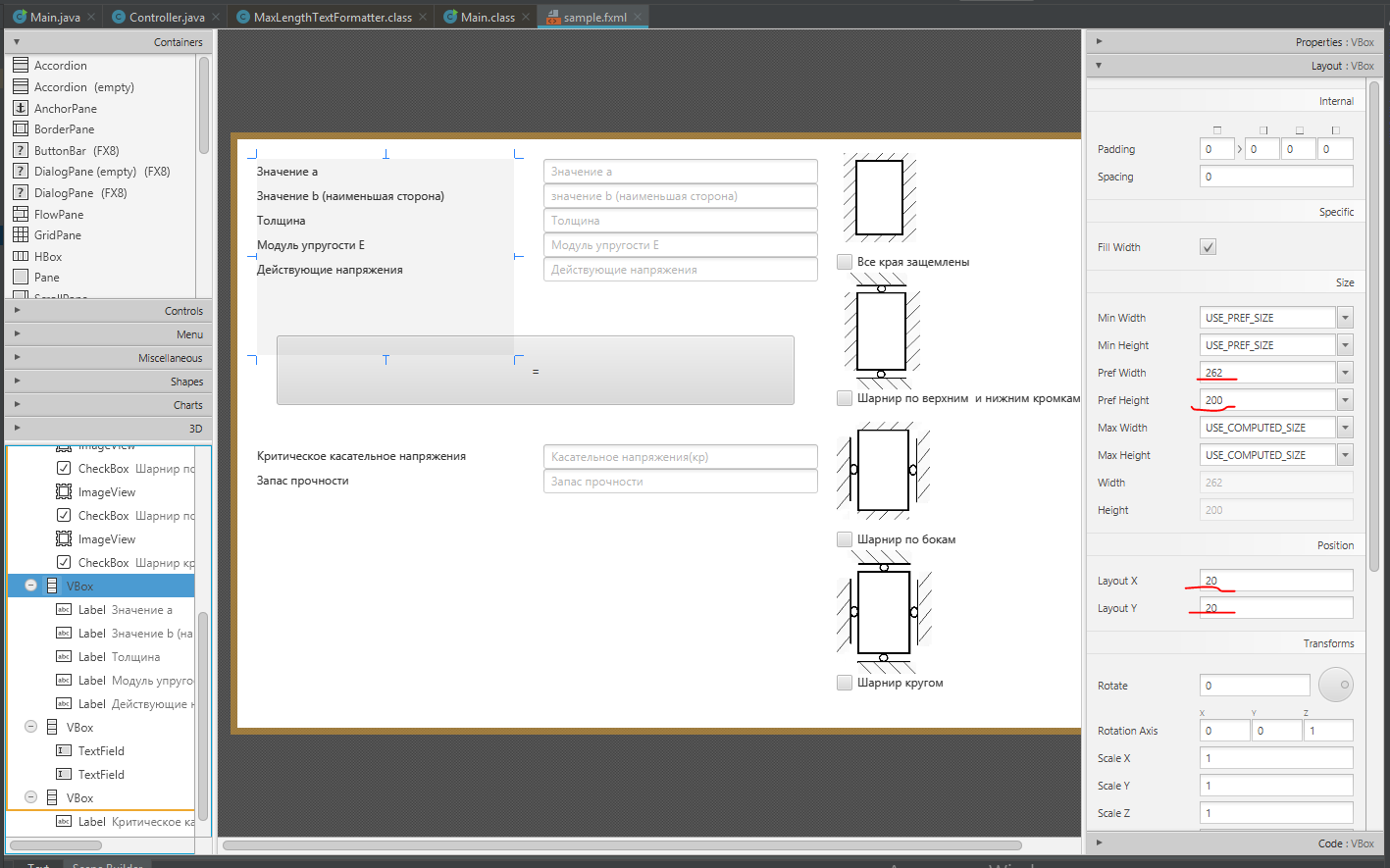
لنقم بإنشاء العديد من الحاويات ذات الأحجام والهوامش (في البداية قمت بعمل العلامات على قطعة من الورق فقط ، لكن القطعة فقدت بالفعل).
بعد ذلك ، دعنا ننتقل إلى الأجزاء الداخلية للحاويات.
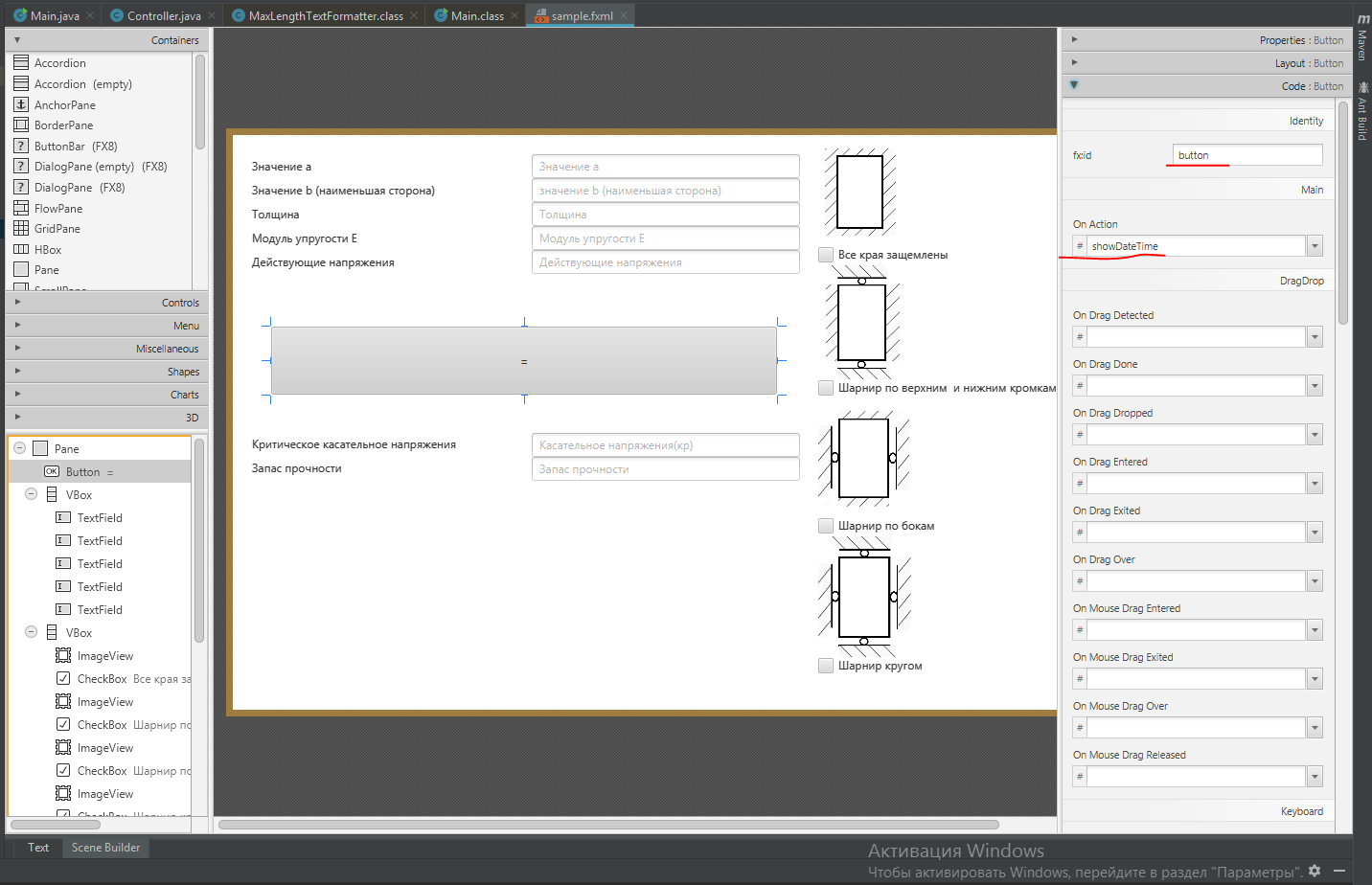
- Button Button
دعنا نخصص اسمًا فريدًا لزرنا واسم الطريقة التي سننفذ بها الكود الخاص بنا
- TextField لنمنح
حقل النص اسمًا فريدًا. هذا الحقل مطلوب لإدخال / إخراج القيم الرقمية. سنضيف أيضًا اسمًا إضافيًا إلى الحقل ، والذي سيختفي عند إدخاله بواسطة رمز

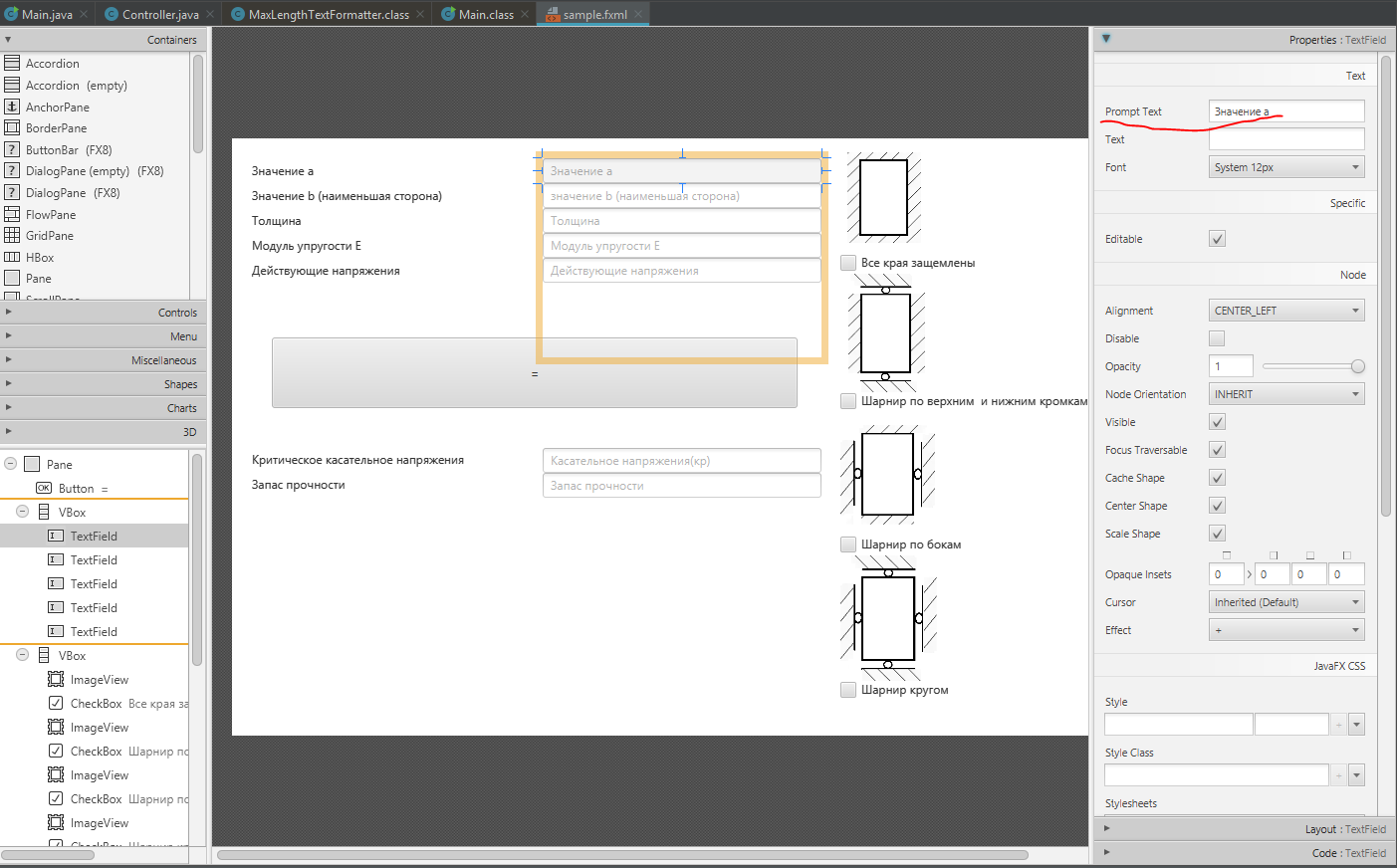
-
حقل التسمية لقد استخدمت حقل التسمية للإشارة إلى الخلايا.
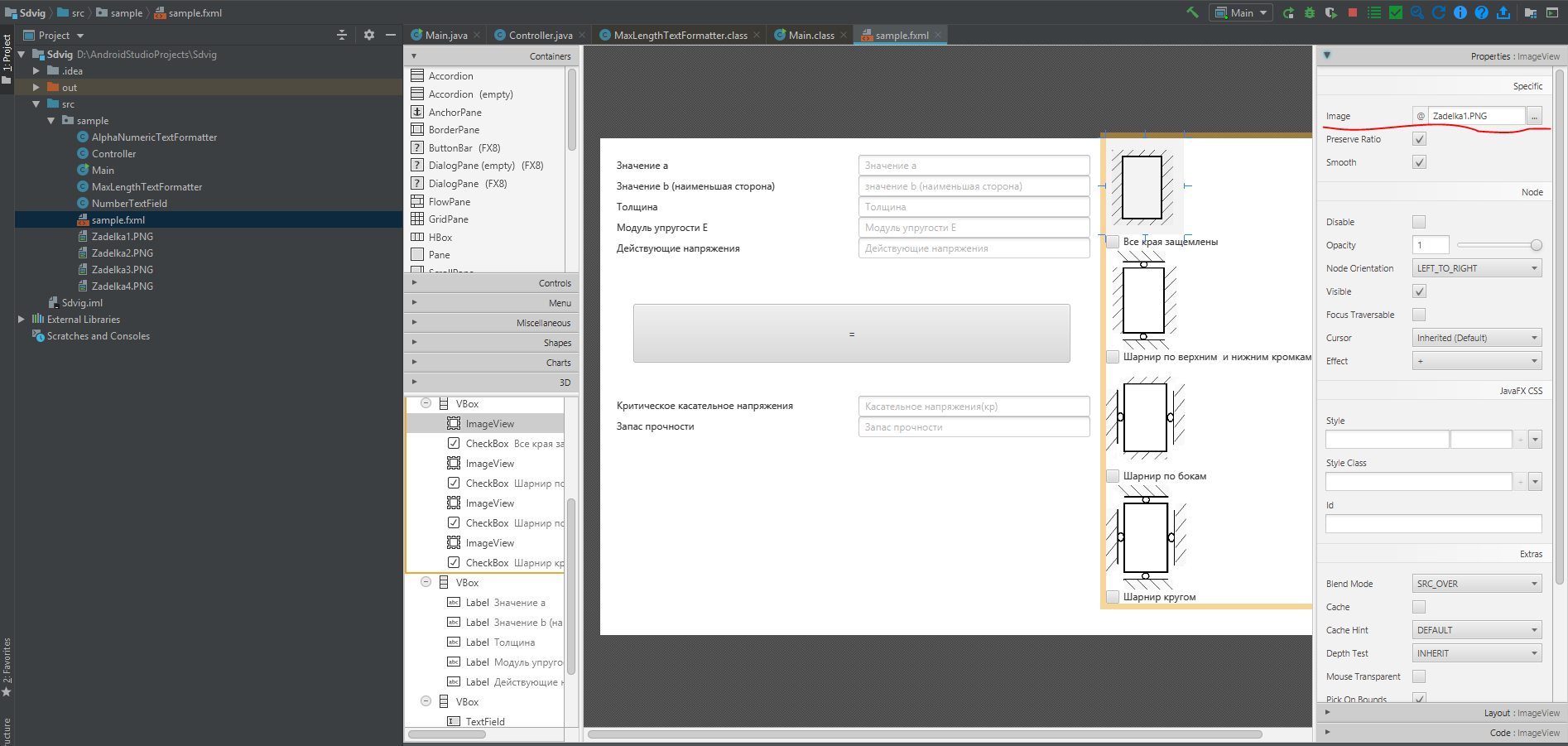
- حقل الصورة
هنا نحدد اسم الصورة الموجودة في المشروع
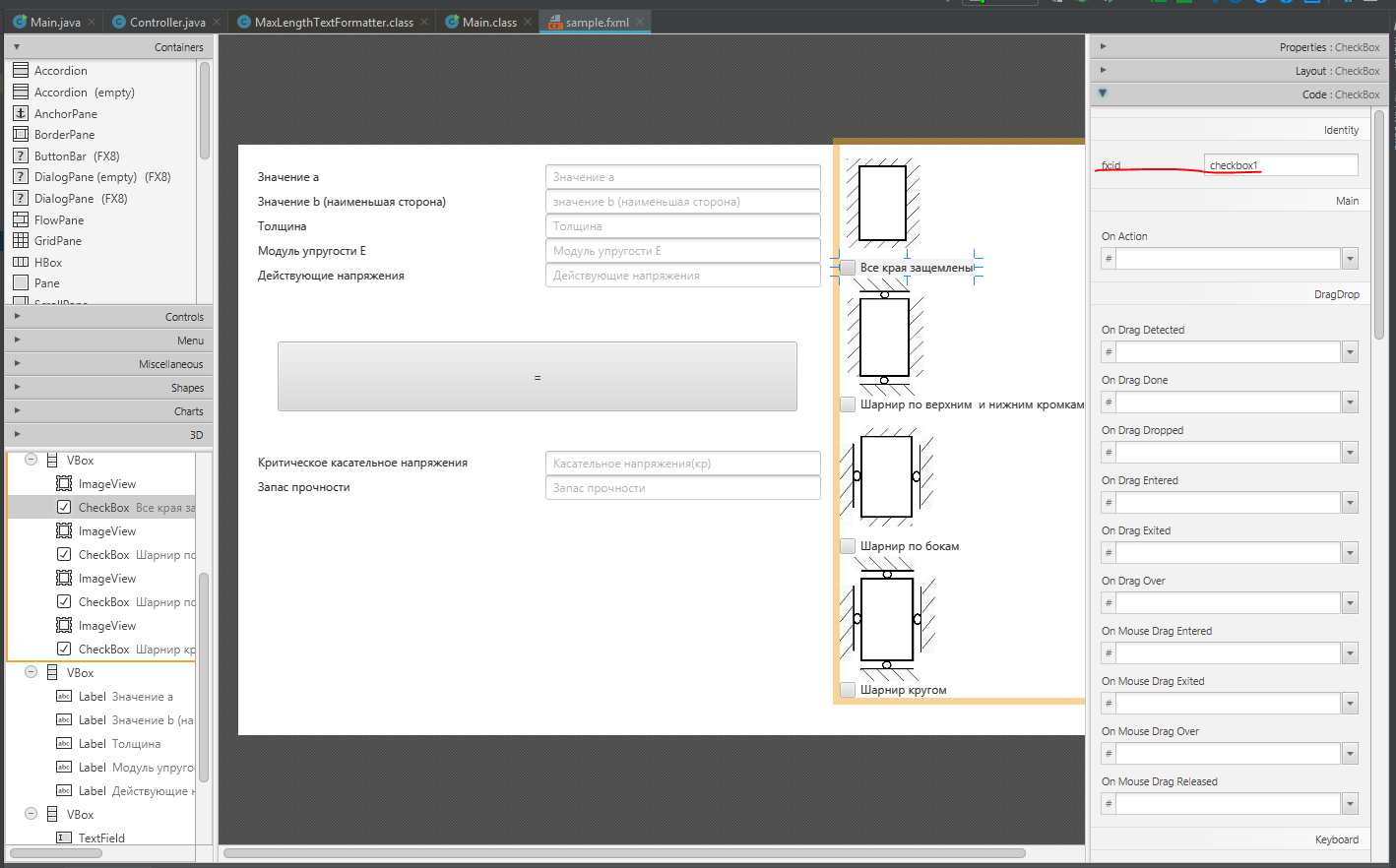
- خانة CheckBox
هنا نحدد اسمًا فريدًا. هذا ضروري لتحديد نوع التثبيت
الكود النهائي لملف sample.fxml
قائمة عينة. fxml
<?xml version="1.0" encoding="UTF-8"?>

<?import javafx.scene.control.Button?>
<?import javafx.scene.control.CheckBox?>
<?import javafx.scene.control.Label?>
<?import javafx.scene.control.TextField?>
<?import javafx.scene.image.Image?>
<?import javafx.scene.image.ImageView?>
<?import javafx.scene.layout.GridPane?>
<?import javafx.scene.layout.Pane?>
<?import javafx.scene.layout.VBox?>

<Pane prefHeight="600.0" prefWidth="900.0" xmlns="http://javafx.com/javafx/8.0.112" xmlns:fx="http://javafx.com/fxml/1" fx:controller="sample.Controller">

   <children>
      <Button fx:id="button" layoutX="40.0" layoutY="200.0" mnemonicParsing="false" onAction="#showDateTime" prefHeight="71.0" prefWidth="528.0" text="=" />

      <VBox layoutX="312.0" layoutY="20.0" minHeight="-Infinity" minWidth="-Infinity" prefHeight="200.0" prefWidth="280.0" GridPane.columnIndex="1">
         <children>
            <TextField fx:id="myTextField1" promptText=" " />
            <TextField fx:id="myTextField2" promptText=" b ( )" />
            <TextField fx:id="myTextField3" promptText="" />
            <TextField fx:id="myTextField4" prefHeight="25.0" prefWidth="280.0" promptText="  " />
            <TextField fx:id="myTextField6" prefHeight="25.0" prefWidth="280.0" promptText=" " />
         </children>
      </VBox>
      <VBox layoutX="611.0" prefHeight="562.0" prefWidth="271.0" GridPane.columnIndex="21">
         <children>
            <ImageView fx:id="image" fitHeight="116.0" fitWidth="174.0" pickOnBounds="true" preserveRatio="true">
               <image>
                  <Image url="@Zadelka1.PNG" />
               </image></ImageView>
            <CheckBox fx:id="checkbox1" mnemonicParsing="false" text="  " />
            <ImageView fitHeight="122.0" fitWidth="237.0" layoutX="30.0" pickOnBounds="true" preserveRatio="true">
               <image>
                  <Image url="@Zadelka2.PNG" />
               </image></ImageView>
            <CheckBox fx:id="checkbox2" mnemonicParsing="false" text="      " />
            <ImageView fitHeight="127.0" fitWidth="272.0" pickOnBounds="true" preserveRatio="true">
               <image>
                  <Image url="@Zadelka3.PNG" />
               </image></ImageView>
            <CheckBox fx:id="checkbox3" mnemonicParsing="false" text="  " />
            <ImageView fitHeight="129.0" fitWidth="392.0" pickOnBounds="true" preserveRatio="true">
               <image>
                  <Image url="@Zadelka4.PNG" />
               </image></ImageView>
            <CheckBox fx:id="checkbox4" mnemonicParsing="false" text=" " />
         </children>
      </VBox>

            <VBox layoutX="20.0" layoutY="20.0" minHeight="-Infinity" minWidth="-Infinity" prefHeight="200.0" prefWidth="262.0">
         <children>
            <Label prefHeight="25.0" prefWidth="185.0" text=" a" />
            <Label prefHeight="25.0" prefWidth="262.0" text=" b ( )" />
            <Label prefHeight="25.0" prefWidth="188.0" text="" />
            <Label prefHeight="25.0" prefWidth="186.0" text="  E" />
            <Label prefHeight="25.0" prefWidth="188.0" text=" " />
         </children>
      </VBox>
      <VBox layoutX="312.0" layoutY="311.0" prefHeight="200.0" prefWidth="280.0">
         <children>
            <TextField fx:id="myTextField5" prefHeight="25.0" prefWidth="280.0" promptText=" ()" />
            <TextField fx:id="myTextField7" prefHeight="25.0" prefWidth="280.0" promptText=" " />
         </children>
      </VBox>
      <VBox layoutX="20.0" layoutY="310.0" prefHeight="200.0" prefWidth="262.0">
         <children>
            <Label prefHeight="25.0" prefWidth="260.0" text="  " />
            <Label prefHeight="25.0" prefWidth="187.0" text=" " />
         </children>
      </VBox>
   </children>

</Pane>
إنشاء الطريقة الرئيسية للفصل الرئيسي
الفئة الرئيسية
package sample;

import javafx.application.Application;

import javafx.fxml.FXMLLoader;
import javafx.scene.Parent;
import javafx.scene.Scene;

import javafx.stage.Stage;


public class Main extends Application  {

    @Override

    public void start(Stage primaryStage) {
        try {
//  sample.fxml( ).
            Parent root = FXMLLoader.load(getClass().getResource("sample.fxml"));
            primaryStage.setTitle(" ");
            primaryStage.setScene(new Scene(root));
            primaryStage.show();

        } catch(Exception e) {
            e.printStackTrace();
        }
    }

    public static void main(String[] args)  {
        launch(args);
    }
}
عند إنشاء فئة التحكم ، يتم تمييز أهمها بالتعليقات
فئة تحكم
ackage sample;

import javafx.fxml.FXML;
import javafx.fxml.Initializable;
import javafx.scene.control.Button;
import javafx.scene.control.CheckBox;
import javafx.scene.control.TextField;
import javafx.stage.Stage;

import java.net.URL;
import java.util.ResourceBundle;

import static java.lang.Double.NaN;
import static java.lang.Double.parseDouble;
import static java.lang.String.valueOf;


public class Controller extends TextField implements Initializable  {


//
    @FXML
    private TextField myTextField4;
    @FXML
    private TextField myTextField1;
    @FXML
    private TextField myTextField2;
    @FXML
    private TextField myTextField3;
    @FXML
    private TextField myTextField5;
    @FXML
    private TextField myTextField6;
    @FXML
    private TextField myTextField7;
    @FXML
    private CheckBox checkbox1;
    @FXML
    private CheckBox checkbox2;
    @FXML
    private CheckBox checkbox3;
    @FXML
    private CheckBox checkbox4;

    private double k;
    private double krit;
    private double zapas;


    @Override
    public void initialize(URL location, ResourceBundle resources) {

        //
        myTextField1.setTextFormatter(new AlphaNumericTextFormatter());
        myTextField2.setTextFormatter(new AlphaNumericTextFormatter());
        myTextField3.setTextFormatter(new AlphaNumericTextFormatter());
        myTextField4.setTextFormatter(new AlphaNumericTextFormatter());
        //myTextField6.setTextFormatter(new AlphaNumericTextFormatter());
    }

    public void showDateTime() throws Exception {


//
        Double a = parseDouble(myTextField1.getText());
        Double b = parseDouble(myTextField2.getText());
        Double t = parseDouble(myTextField3.getText());
        Double e = parseDouble(myTextField4.getText());
        Double c = b / a;
//  CheckBox
        if (checkbox1.isSelected()) {
            if (c <= 0.1) {
                k = 8;
            } else if ((c > 0.1) && (c <= 0.15)) {
                k = 8.5;
            } else if ((c > 0.15) && (c <= 0.2)) {
                k = 8.8;
            } else if ((c > 0.2) && (c <= 0.25)) {
                k = 9;
            } else if ((c > 0.25) && (c <= 0.30)) {
                k = 9.2;
            } else if ((c > 0.3) && (c <= 0.35)) {
                k = 9.5;
            } else if ((c > 0.35) && (c <= 0.40)) {
                k = 9.8;
            } else if ((c > 0.40) && (c <= 0.45)) {
                k = 10.3;
            } else if ((c > 0.45) && (c <= 0.50)) {
                k = 10.5;
            } else if ((c > 0.5) && (c <= 0.55)) {
                k = 10.8;
            } else if ((c > 0.55) && (c <= 0.6)) {
                k = 11;
            } else if ((c > 0.6) && (c <= 0.65)) {
                k = 11.5;
            } else if ((c > 0.65) && (c <= 0.7)) {
                k = 11.8;
            } else if ((c > 0.7) && (c <= 0.75)) {
                k = 12;
            } else if ((c > 0.75) && (c <= 0.8)) {
                k = 12.5;
            } else if ((c > 0.8) && (c <= 0.85)) {
                k = 12.8;
            } else if ((c > 0.85) && (c <= 0.9)) {
                k = 13;
            } else if ((c > 0.9) && (c <= 0.95)) {
                k = 13.5;
            } else if ((c > 0.95) && (c <= 1)) {
                k = 14;
            }
            krit = (k * e) / (Math.pow((b / t), 2));

            String d = valueOf(krit);
            //
            myTextField5.setText(d);
            }
            else if (checkbox2.isSelected()) {
                if (c <= 0.1) {
                    k = 8;
                } else if ((c > 0.1) && (c <= 0.15)) {
                    k = 8.2;
                } else if ((c > 0.15) && (c <= 0.2)) {
                    k = 8.4;
                } else if ((c > 0.2) && (c <= 0.25)) {
                    k = 8.5;
                } else if ((c > 0.25) && (c <= 0.30)) {
                    k = 8.6;
                } else if ((c > 0.3) && (c <= 0.35)) {
                    k = 8.7;
                } else if ((c > 0.35) && (c <= 0.40)) {
                    k = 8.9;
                } else if ((c > 0.40) && (c <= 0.45)) {
                    k = 9;
                } else if ((c > 0.45) && (c <= 0.50)) {
                    k = 9.2;
                } else if ((c > 0.5) && (c <= 0.55)) {
                    k = 9.4;
                } else if ((c > 0.55) && (c <= 0.6)) {
                    k = 9.5;
                } else if ((c > 0.6) && (c <= 0.65)) {
                    k = 9.7;
                } else if ((c > 0.65) && (c <= 0.7)) {
                    k = 10;
                } else if ((c > 0.7) && (c <= 0.75)) {
                    k = 10;
                } else if ((c > 0.75) && (c <= 0.8)) {
                    k = 10.2;
                } else if ((c > 0.8) && (c <= 0.85)) {
                    k = 10.5;
                } else if ((c > 0.85) && (c <= 0.9)) {
                    k = 10.6;
                } else if ((c > 0.9) && (c <= 0.95)) {
                    k = 11;
                } else if ((c > 0.95) && (c <= 1)) {
                    k = 11;
                }
            krit = (k * e) / (Math.pow((b / t), 2));

            String d = valueOf(krit);
            myTextField5.setText(d);
            }

        else if (checkbox3.isSelected()) {
            if (c <= 0.1) {
                k = 4.9;
            } else if ((c > 0.1) && (c <= 0.15)) {
                k = 5.1;
            } else if ((c > 0.15) && (c <= 0.2)) {
                k = 5.2;
            } else if ((c > 0.2) && (c <= 0.25)) {
                k = 5.5;
            } else if ((c > 0.25) && (c <= 0.30)) {
                k = 5.8;
            } else if ((c > 0.3) && (c <= 0.35)) {
                k = 6;
            } else if ((c > 0.35) && (c <= 0.40)) {
                k = 6.2;
            } else if ((c > 0.40) && (c <= 0.45)) {
                k = 6.5;
            } else if ((c > 0.45) && (c <= 0.50)) {
                k = 6.9;
            } else if ((c > 0.5) && (c <= 0.55)) {
                k = 7;
            } else if ((c > 0.55) && (c <= 0.6)) {
                k = 7.5;
            } else if ((c > 0.6) && (c <= 0.65)) {
                k = 8;
            } else if ((c > 0.65) && (c <= 0.7)) {
                k = 8.2;
            } else if ((c > 0.7) && (c <= 0.75)) {
                k = 8.5;
            } else if ((c > 0.75) && (c <= 0.8)) {
                k = 9.1;
            } else if ((c > 0.8) && (c <= 0.85)) {
                k = 9.5;
            } else if ((c > 0.85) && (c <= 0.9)) {
                k = 10;
            } else if ((c > 0.9) && (c <= 0.95)) {
                k = 10.5;
            } else if ((c > 0.95) && (c <= 1)) {
                k = 11;
            }
            krit = (k * e) / (Math.pow((b / t), 2));

            String d = valueOf(krit);
            myTextField5.setText(d);
        }
        else if (checkbox4.isSelected()) {
            if (c <= 0.1) {
                k = 4.8;
            } else if ((c > 0.1) && (c <= 0.15)) {
                k = 5;
            } else if ((c > 0.15) && (c <= 0.2)) {
                k = 5;
            } else if ((c > 0.2) && (c <= 0.25)) {
                k = 5.1;
            } else if ((c > 0.25) && (c <= 0.30)) {
                k = 5.2;
            } else if ((c > 0.3) && (c <= 0.35)) {
                k = 5.4;
            } else if ((c > 0.35) && (c <= 0.40)) {
                k = 5.5;
            } else if ((c > 0.40) && (c <= 0.45)) {
                k = 5.6;
            } else if ((c > 0.45) && (c <= 0.50)) {
                k = 5.9;
            } else if ((c > 0.5) && (c <= 0.55)) {
                k = 6;
            } else if ((c > 0.55) && (c <= 0.6)) {
                k = 6.2;
            } else if ((c > 0.6) && (c <= 0.65)) {
                k = 6.5;
            } else if ((c > 0.65) && (c <= 0.7)) {
                k = 6.7;
            } else if ((c > 0.7) && (c <= 0.75)) {
                k = 7;
            } else if ((c > 0.75) && (c <= 0.8)) {
                k = 7.1;
            } else if ((c > 0.8) && (c <= 0.85)) {
                k = 7.4;
            } else if ((c > 0.85) && (c <= 0.9)) {
                k = 7.8;
            } else if ((c > 0.9) && (c <= 0.95)) {
                k = 8;
            } else if ((c > 0.95) && (c <= 1)) {
                k = 8.3;
            }
            krit = (k * e) / (Math.pow((b / t), 2));
            String d = valueOf(krit);
            myTextField5.setText(d);

        }
        Double f = parseDouble(myTextField6.getText());
            zapas = krit/f;
            String g = valueOf(zapas);
            myTextField7.setText(g);
        }
        }
إنشاء صنفين لتطبيق مرشح إدخال البيانات (باستثناء الحروف ، بالإضافة إلى القدرة على تحديد عدد المدخلات / المخرجات). الحل ليس لي ، لكنني وجدته في نظام Stackoverflow. من بين جميع الحلول المقترحة ، بدا لي أنه الأبسط والأكثر قابلية للفهم.
فئة منسق AlphaNumericTextFormatter
فئة منسق AlphaNumericTextFormatter
public class AlphaNumericTextFormatter extends TextFormatter<String> {

    /** The Constant ALPHA_NUMERIC_ONLY. */
    //private static final String ALPHA_NUMERIC_ONLY = "^[a-zA-Z0-9]*$";
    /** MAKE NUMERIC ONLY **/
    private static final String DIGITS_ONLY = "^[0-9.]*$";

    /**
     * Instantiates a new alpha numeric text formatter.
     */
    public AlphaNumericTextFormatter() {
        super(applyFilter(null));
    }

    /**
     * Instantiates a new alpha numeric text formatter.
     *
     * @param maxLength
     *            the max length
     */
    public AlphaNumericTextFormatter(int maxLength) {
        super(applyFilter(new MaxLengthTextFormatter(maxLength).getFilter()));
    }

    /**
     * Apply filter.
     *
     * @param filter
     *            the filter
     * @return the unary operator
     */
    private static UnaryOperator<Change> applyFilter(UnaryOperator<Change> filter) {
        return change -> {
            if (change.getControlNewText() != null && change.getControlNewText().matches(DIGITS_ONLY)) {
                if (filter != null) {
                    filter.apply(change);
                }
                return change;
            }
            return null;
        };
    }

}
فئة MaxLengthTextFormatter
قائمة التعليمات البرمجية
package sample;

import java.util.function.UnaryOperator;
import javafx.scene.control.TextFormatter;
import javafx.scene.control.TextFormatter.Change;

public class MaxLengthTextFormatter extends TextFormatter<String> {
    private int maxLength;

    public MaxLengthTextFormatter(final int maxLength) {
        super(new UnaryOperator<Change>() {
            public Change apply(Change change) {
                if (change.isDeleted()) {
                    if (change.getControlNewText().length() > maxLength) {
                        change.setText(change.getText().substring(0, maxLength));
                    }
                } else if (change.getControlText().length() + change.getText().length() >= maxLength) {
                    int maxPos = maxLength - change.getControlText().length();
                    change.setText(change.getText().substring(0, maxPos));
                }

                return change;
            }
        });
        this.maxLength = maxLength;
    }

    public int getMaxLength() {
        return this.maxLength;
    }
}
حسنًا ، في نهاية إنشاء ملف الجرة
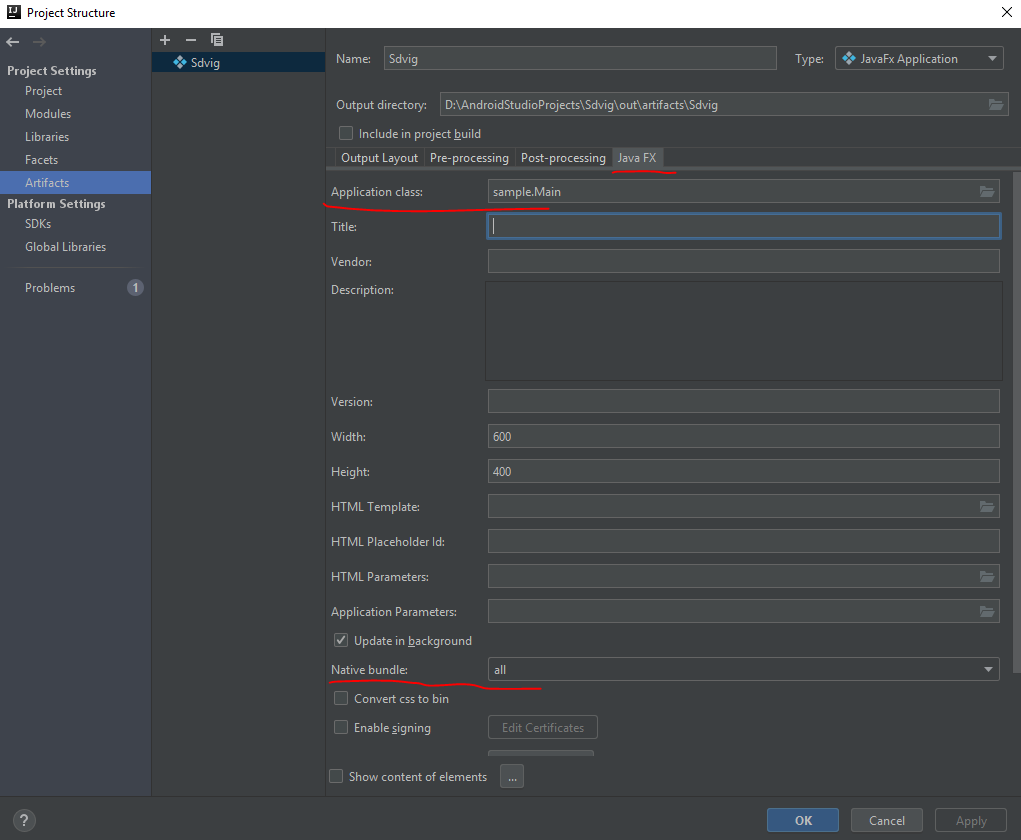

هذا كل شئ. الملف جاهز الآن ليتم تشغيله على أي جهاز كمبيوتر مثبت عليه جافا.