في الإصدار الكلاسيكي من MultiSIM Reservation ، عند تقديم خدمات IPVPN عبر شبكتين للهاتف المحمول ، هناك المشاكل التالية:
- لكل عميل ، تحتاج إلى إنشاء APN الخاص بك ، أو تكوين BGP أو التوجيه الثابت فيه ، واحسب على الفور العدد المطلوب من المضيفين لخطة عنونة IP الصحيحة.
- , , .
- ().
- IPVPN LTE , , — IPVPN LTE «».
من ناحية أخرى ، لدينا IPSec ، حيث يتم استخراج جميع إعدادات التوجيه والعميل من النقل ، سواء كانت قناة إنترنت سلكية أو LTE لمشغلين مختلفين ، ويمكن أيضًا تخزين ملصقات المرور داخل النفق ، وإن كان ذلك بدون توفير اتفاقية مستوى الخدمة ، منذ الإنترنت وخاصة LTE / 3G هي وسيلة غير متوقعة لنقل البيانات.
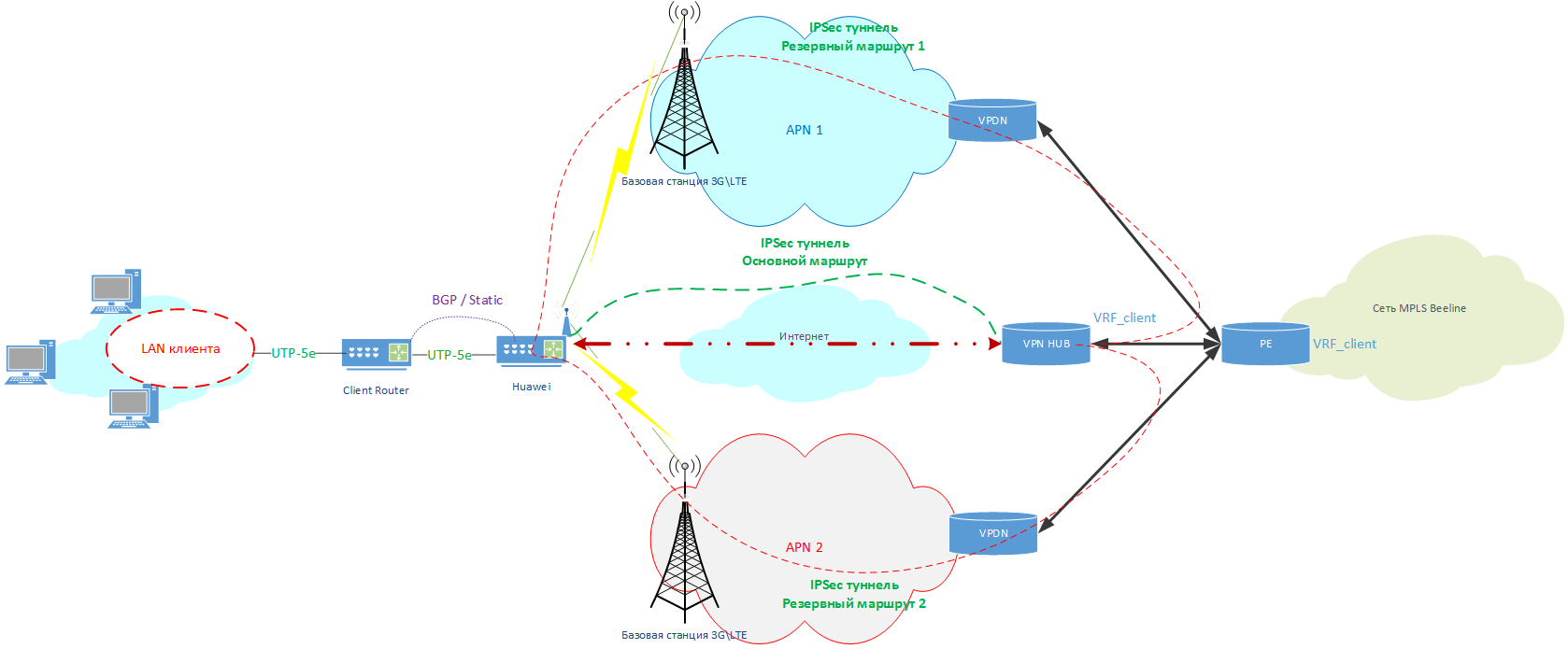
لذلك ، كانت لدينا فكرة - "لماذا لا تستخدم IPsec عبر LTE أيضًا؟" ضع بطاقات SIM القياسية مع APNs التي تم إنشاؤها مسبقًا في أجهزة التوجيه وقم ببناء IPSEC من خلالها إلى VPN HUB الخاص بنا وتحرير العميل إلى VRF الخاص به. وإذا كانت هناك قناة سلكية ، فاستخدم اتصالًا سلكيًا كوسيلة نقل رئيسية ، وفي حالة وقوع حادث ، قم بتحويل حركة المرور إلى LTE.
وهكذا ، بدأ مخطط الشبكة بالشكل التالي:
قابل للنقر
يحصل العميل على ما يصل إلى ثلاث قنوات WAN في وقت واحد ، والتي ستلعب دور "الأساس" لحركة مرور IPSec:
- قناة اتصال سلكية بالإنترنت.
- أول شبكة LTE (رئيسية).
- الثانية (النسخ الاحتياطي) شبكة LTE (إذا لزم الأمر).
الآن يبقى اختيار وتكوين جهاز توجيه لخيار تقديم الخدمة هذا.
تكوين جهاز توجيه
عند اختيار جهاز توجيه ، كنا مهتمين بطرازين من Huawei - AR161 و AR129. لديهم دعم IPSec ، ومودم LTE مع دعم لبطاقتي SIM ، و 4 منافذ Ethernet LAN + 1 Ethernet WAN ، ونموذج AR129 يحتوي أيضًا على WiFi ، أي كل ما هو مطلوب لعمل دائرتنا ، وحتى أكثر من ذلك بقليل.
ولكن مع الإعدادات ، أصبح كل شيء أكثر تعقيدًا.
أثناء تكوين أجهزة التوجيه لـ Multisim Redundancy ، واجهنا مشكلة الأولويات بين WAN السلكية وشبكتي LTE من أجل اختيار أفضل مسار لحركة المرور.
يحتوي Huawei AR161 / 129 على أداتين لهذا:
- وظيفة تحليل جودة الشبكة (المعروف أيضًا باسم اختبار NQA).
يجري اختبارًا أساسيًا مع طلبات icmp للمضيف المحدد لتحديد مدى توفره. - افتح نظام البرمجة (OPS) + وظائف Python.
أداة قوية للغاية ، فهي تسمح لك بحفظ المعلومات في السجلات وإجراء تبديل "ذكي" بناءً على إحصائيات icmp ، ولكن يصعب أيضًا تعلمها.
لحل مشكلتنا ، اخترنا وظيفة OPS + Python لتمكين شريحتي LTE SIM فقط ، والوضع المختلط للإنترنت + شريحتي LTE SIM.
التكوين التقريبي لأجهزة التوجيه هو كما يلي:
في حالة اتصال 2x Sim LTE فقط
#  IP    WAN  (  DHCP)
interface GigabitEthernet0/0/4
ip address dhcp-alloc

# APN , Cellular0/0/0
apn profile [APN #1]
 apn [APN 1 NAME]
apn profile [APN #2]
 apn [APN 2 NAME]
 sim-id 2

# Cellular0/0/0
interface Cellular0/0/0
dialer enable-circular
 apn-profile [APN #1] priority 120
 apn-profile [APN #2]
 dialer timer autodial 60
 profile create lte-default [APN #1] sim-id 1
 profile create lte-default [APN #2] sim-id 2
 ip address negotiate
modem reboot

# IPSec
ipsec authentication sha2 compatible enable
ike local-name [IPSEC_LOGIN]

#   IPSec
ipsec proposal ipsec
 esp authentication-algorithm sha2-256
 esp encryption-algorithm aes-256
ike proposal 1
 encryption-algorithm aes-256
 dh group2
 authentication-algorithm sha2-256
 authentication-method pre-share
 integrity-algorithm hmac-sha2-256
 prf hmac-sha2-256

#  IPSec
ike peer ipsec_1
 pre-shared-key simple [IPSEC_PASSWORD]
 ike-proposal 1
 local-id-type fqdn
 remote-id-type ip
 dpd type periodic
 dpd idle-time 10
 dpd retransmit-interval 2
 remote-address 100.64.0.100
 route accept
 config-exchange request
 config-exchange set accept
 config-exchange set send
ipsec profile ipsecprof_1
 ike-peer ipsec_1
 proposal ipsec

# IPSec -
interface Tunnel0/0/0
tunnel-protocol ipsec
 ip address [ IP   - Huawei]  255.255.255.252
source Cellular0/0/0
ipsec profile ipsecprof_1

#
ip route-static 0.0.0.0 0.0.0.0 Tunnel0/0/0
ip route-static [VPN HUB INTERNAL ADDRESS] 255.255.0.0 Cellular0/0/0
في حالة الإنترنت + 2x Sim LTE-إدراج
#  IP    WAN  (  DHCP)
interface GigabitEthernet0/0/4
ip address dhcp-alloc

# APN , Cellular0/0/0
apn profile [APN #1]
 apn [APN 1 NAME]
apn profile [APN #2]
 apn [APN 2 NAME]
 sim-id 2

# Cellular0/0/0
interface Cellular0/0/0
dialer enable-circular
 apn-profile [APN #1] priority 120
 apn-profile [APN #2]
 dialer timer autodial 60
 profile create lte-default [APN #1] sim-id 1
 profile create lte-default [APN #2] sim-id 2
 ip address negotiate
modem reboot

# IPSec
ipsec authentication sha2 compatible enable
ike local-name [IPSEC_LOGIN]

#   IPSec
ipsec proposal ipsec
 esp authentication-algorithm sha2-256
 esp encryption-algorithm aes-256
ike proposal 1
 encryption-algorithm aes-256
 dh group2
 authentication-algorithm sha2-256
 authentication-method pre-share
 integrity-algorithm hmac-sha2-256
 prf hmac-sha2-256

#  IPSec
ike peer ipsec_1
 pre-shared-key simple [IPSEC_PASSWORD]
 ike-proposal 1
 local-id-type fqdn
 remote-id-type ip
 dpd type periodic
 dpd idle-time 10
 dpd retransmit-interval 2
 remote-address 81.211.80.50
 route accept
 config-exchange request
 config-exchange set accept
 config-exchange set send
ipsec profile ipsecprof_1
 ike-peer ipsec_1
 proposal ipsec

ike peer ipsec_2
 pre-shared-key simple [IPSEC_PASSWORD]
 ike-proposal 1
 local-id-type fqdn
 remote-id-type ip
 dpd type periodic
 dpd idle-time 10
 dpd retransmit-interval 2
 remote-address [VPN HUB INTERNAL ADDRESS]
 route accept
 config-exchange request
 config-exchange set accept
 config-exchange set send
ipsec profile ipsecprof_2
 ike-peer ipsec_2
 proposal ipsec

# IPSec-
interface LoopBack32
 ip address [ IP   - Huawei]  255.255.255.252

interface Tunnel0/0/0
ip address unnumbered interface LoopBack32
tunnel-protocol ipsec
 source GigabitEthernet0/0/1
 ipsec profile ipsecprof_1

interface Tunnel0/0/1
ip address unnumbered interface LoopBack32
tunnel-protocol ipsec
 source Cellular0/0/0
 ipsec profile ipsecprof_2

#   (   )
nqa test-instance [username] inet
 test-type icmp
 destination-address ipv4 81.211.80.50
 source-interface GigabitEthernet0/0/4
 frequency 16
 probe-count 2
 start now

#
ip route-static 81.211.80.50 255.255.255.255 GigabitEthernet 0/0/4 dhcp track nqa [username] inet
ip route-static [VPN HUB INTERNAL ADDRESS] 255.255.255.255 NULL0 track nqa [username] inet
ip route-static [VPN HUB INTERNAL ADDRESS] 255.255.0.0 Cellular0/0/0 preference 70
ip route-static 80.240.216.155 255.255.255.255 GigabitEthernet 0/0/4 dhcp
ip route-static 194.67.0.206 255.255.255.255 GigabitEthernet 0/0/4 dhcp
كل شيء ، يمكن تثبيت جهاز التوجيه الذي تم تكوينه على العميل.
الخطط
من الخطط لتطوير هذا الحل:
- افعل الشيء نفسه ، ولكن على أجهزة توجيه Cisco / Mikrotik.
- ترجمة كل منطق التبديل إلى OPS + Python فقط
في المقالات التالية ، سنخبرك كيف كوننا أصدقاء لخدمات حجز Multisim من خلال Cloud PBX ، وجعلنا وضع L2-over-L3 على نفس النطاق باستخدام x-connect ، وسنضع نصوصًا لتبديل بطاقات SIM في Python ونخبر عن نشر USB على أجهزة التوجيه.
شكراً لزملائي من RnD ، وخاصة دينيس زينتشينكو (دزينش) وأندريه فورونوف في إعداد هذه الحلول التقنية والمساعدة في كتابة المقال!
ملاحظة: الجزء الأول من المنشور هنا .